🎮 How to Create a Game ID – Legend of Edda 2
- Legend Of Edda 2

- Feb 14
- 1 min read

🎮 How to Create a Game ID – Legend of Edda 2
Follow the steps below to create your Game ID for Legend of Edda 2:
🔐 Step 1: Log In
Go to the official Legend of Edda 2 website.

Click Member.
Enter the email address and password you used during registration.

Press Login.
⚠️ You must log in using the registered email account before creating a Game ID.
🆔 Step 2: Access Game Servers
After logging in, navigate to the Game Servers section.
You will see the Game ID panel.
Click “Create New Game ID”.

📝 Step 3: Create Your Game ID
Enter your desired Game ID name.
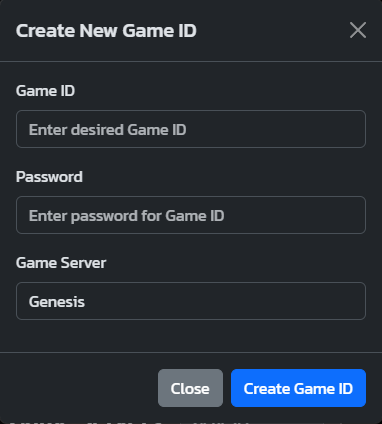
Make sure the ID follows the naming rules:
No special characters
No inappropriate words
Must be unique
Click Confirm or Create.
✅ Step 4: Completion
Once successfully created, your Game ID will appear under the Game Servers list.
You can now use this Game ID to log in to the game client.
📌 Notes
Each account can create up to 5 Game IDs.
Make sure to remember your Game ID.
If you encounter any issues, please contact support.


Comments